 Operalytix
 Every hour, accounted for. The free time clock app for iPhone — attendance, time off and pay.
Clock-ins checked at the door. Pay explained line by line. Periods that lock. An iPhone app for your team and a web dashboard for whoever runs payroll — free.
Create your organisation in the app — no card, no sales call.
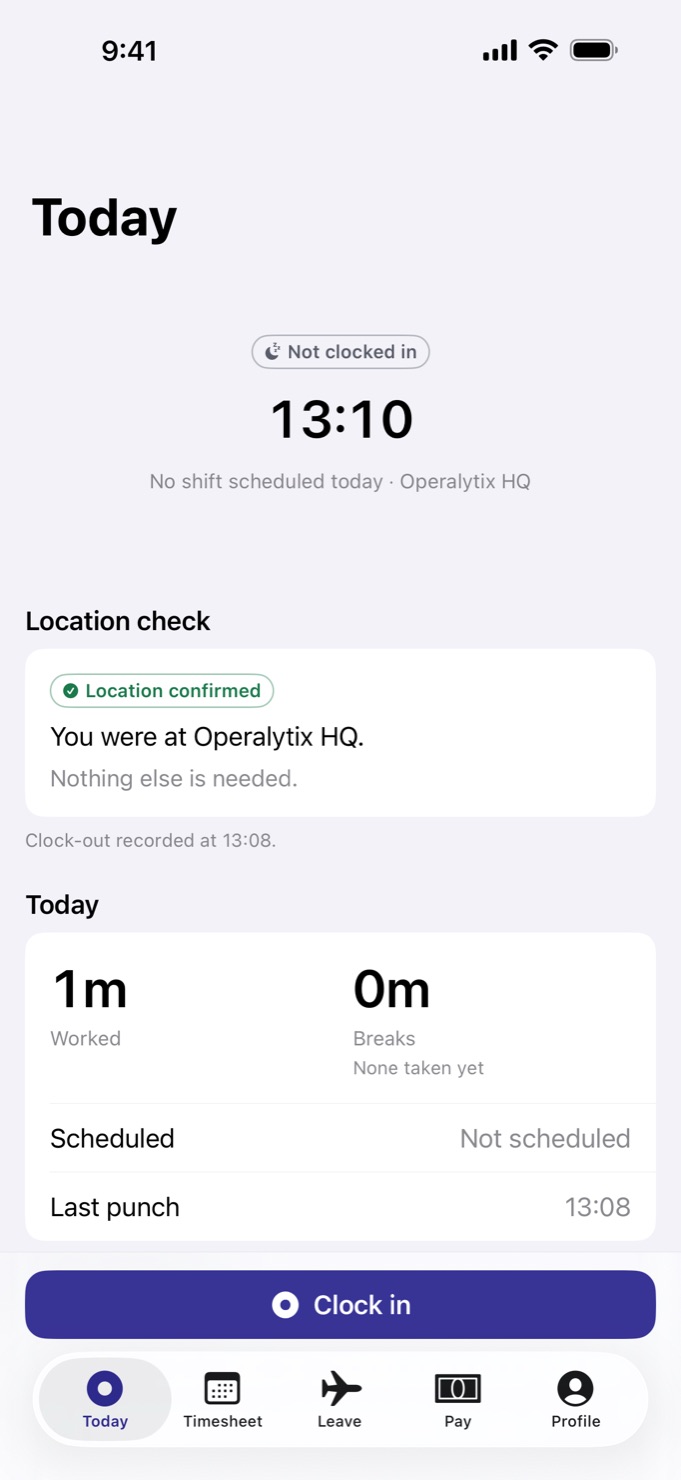
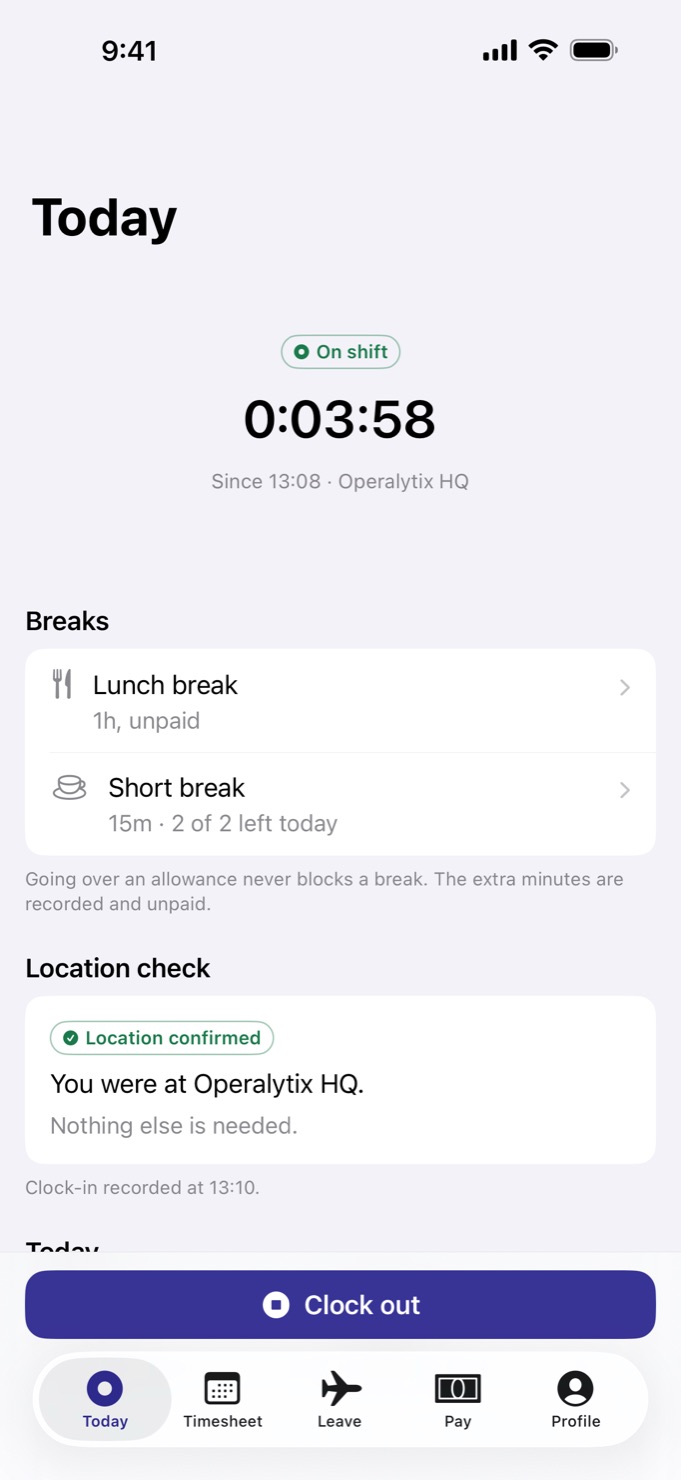
Who's right on payday?
Paper timesheets, guessed hours and payday arguments cost more than anyone budgets for. Operalytix replaces the guessing with a record everyone can trust.
Proof of presence
Clock-ins need a precise, fresh location fix and are checked against your office's boundary. Anything unusual is flagged for a person to decide — never silently dropped.
Pay anyone can follow
Every line of pay — hours, overtime, bonuses, deductions — shows the rule behind it. Employees can dispute any line, right from the app.
Periods that close cleanly
Review the queue, lock the period, export for payroll. A locked period stays final; a later change is booked as an offsetting entry in the next one.
Employee time clock & timesheet app
Your whole working day, in your pocket.
Clock in at the door, take your breaks, check your hours, ask for time off and see exactly how your pay adds up. No forms, no chasing, no surprises on payday.
Clock in with one tap
Clock in, start and end your lunch or short breaks, and clock out from the Today screen. The app confirms you're at your workplace before the shift starts, and shows your break allowance as you go.
Works without signal
A punch taken without a connection is saved on the phone and sent automatically once you're back online. Basements and dead zones don't cost anyone their hours.
Right on your Lock Screen
Home Screen and Lock Screen widgets, a Live Activity for the shift in progress, and a Control Center control that opens the app ready to clock in.
A timesheet you can check
Every day's hours and breaks, by week or by month — and which days are still waiting for a manager's review.
Time off without the paperwork
Request vacation or sick leave, photograph a sick note and attach it, then follow the request until it's decided. Your balances, public holidays and every past request are one tap away.
Pay, line by line
See how the period's pay adds up — hours, overtime, bonuses and any deductions, each with the rule behind it. Think a line is wrong? Dispute it from the app.
Reminders that arrive on time
Shift starting soon, running late, a forgotten clock-out, leave decisions, replies from your manager. The urgent ones arrive as Time Sensitive notifications, and an optional reminder can nudge you as you reach the office.
Ask, and get an answer
Open a request for your administrators from inside the app and follow the conversation in one thread. Messages from your employer land in your notifications.
Try it: what happens when you tap Clock in
IllustrationDrag the blue dot, tap the map, or focus the dot and use the arrow keys.
Location confirmed: inside the 100 m office area. Nothing else is needed.
Location is read at the moment of a punch — nothing between. Simplified illustration; your administrator sets the radius.
Timesheet, Leave, Pay and Lock Screen are illustrations of the app's screens with sample data.
Attendance & leave management for admins
Run the whole team from the same app.
Nothing waits until payday to be noticed. Flagged punches, leave and vacation requests, missed days and disputes land in one place: the Admin tab, which appears for the people you make administrators, behind a second sign-in factor.
One queue for every decision
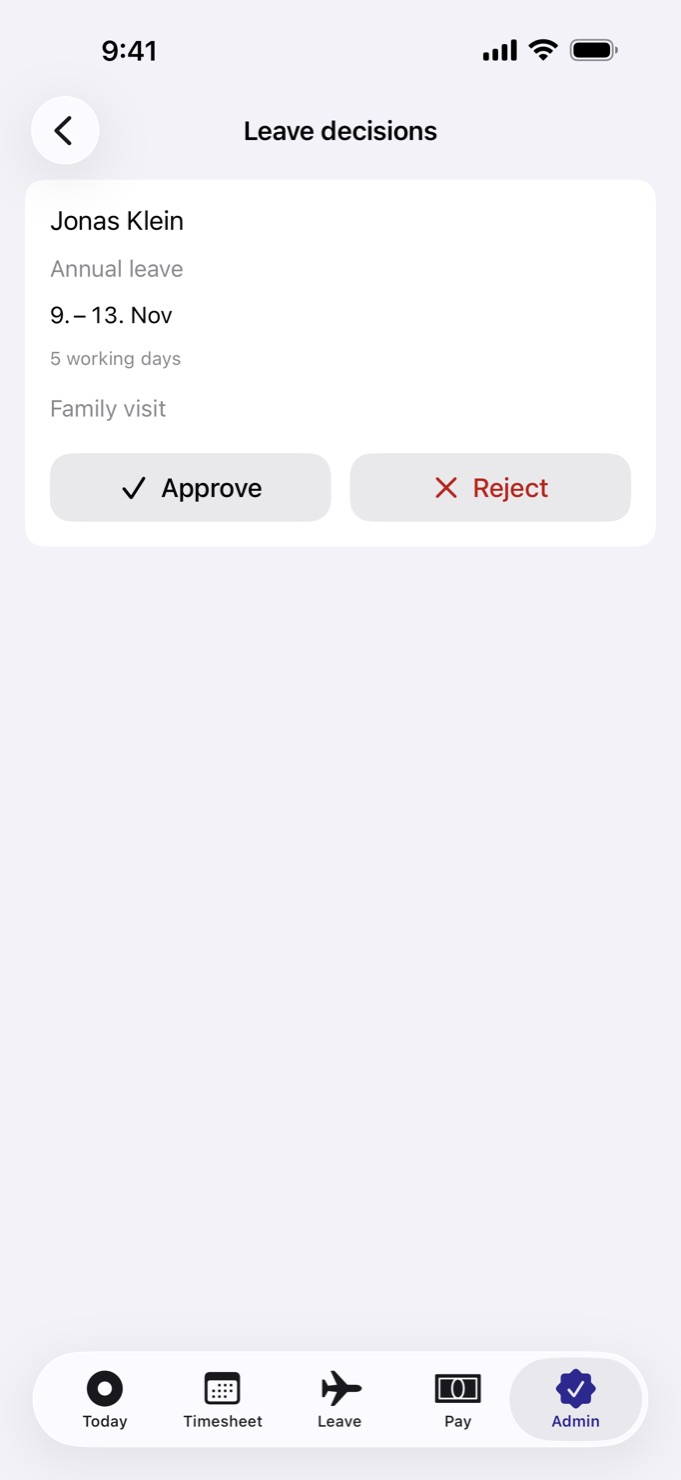
Flagged punches, shifts to review, leave requests, missed days and pay disputes — all in one place. Approve, reject or correct in a tap.
Approve leave with the full picture
The team time-off calendar sits alongside every request, so you can see who else is away before you say yes.
Corrections with a reason
Fix a forgotten clock-out or a wrong break. Every correction records who made it and why — in the employee's timesheet and the audit log.
Schedules that fit real shifts
Shift scheduling per office and per employee, including night shifts that run past midnight — a 22:00–06:00 shift counts as one working day, the day it began.
Offices on the map
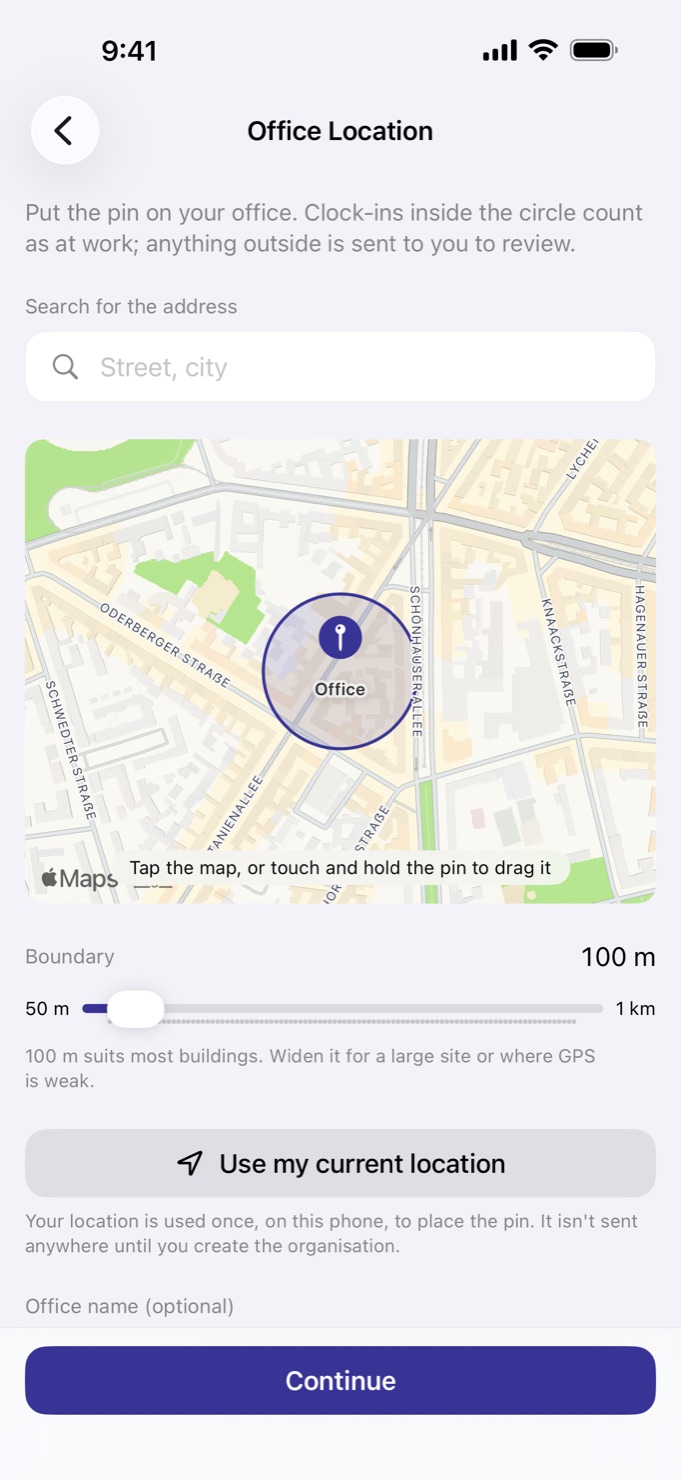
Drop a pin on each office and set its boundary, from 50 metres to a kilometre. Clock-ins inside count as at work; anything outside comes to you for review.
House rules, applied evenly
Break allowances and fine rules for late arrival, early departure and break overruns, plus an optional no-show fine. Every fine comes with a notice window in which the employee can dispute it.
Broadcasts that get read
Message everyone, or just the people you choose. See who hasn't read it yet and send it again.
Invitation-only by design
Each employee receives an email invitation and sets their own password. Nobody can sign up to your organisation on their own.
Missed-day review
A missed day is a decision — not a silent deduction.
When someone on a fixed monthly salary has a scheduled day with no clock-in, Operalytix doesn't guess. The day goes to an administrator, who decides what it was.
- A fine — suggested at one day's pay, or your policy's no-show fine
- A paid day off, or a day taken from a leave balance
- An unpaid day
- The employee is notified of the outcome and can dispute a fine; the decision can be changed while the period is open
Tap a scheduled day to mark it a public holiday.
Scheduled working days in October 2026: 22
One day’s pay: €2,600.00 ÷ 22 = €118.18
Checked in the order Operalytix checks them; the first that applies wins.
Payroll-ready exports
Pay that adds up. Every single period.
Monthly salaries and hourly rates, overtime at your multiplier, bonuses, fines and adjustments — collected on one ledger, per pay period, and exported in the shape your payroll expects.
Fixed monthly salary
Paid in full regardless of daily hours. Missed days are reviewed by a person, never deducted automatically.
Hourly pay
Worked time after unpaid breaks, at each person's own rate, straight from the punches.
Overtime with multipliers
Set a weekly threshold and a multiplier, and optionally require approval. Overtime shows as its own line.
Bonuses, fines, adjustments
Every entry carries its reason and its author. Entries are never edited away — only voided or offset, in the open.
Pay periods that lock
Review, then lock: a locked period is final. The owner or accounting can unlock one when a correction is genuinely needed.
CSV & Excel export
A locked period exports final figures. An open period can export too — clearly marked provisional.
Disputes, built in
Employees can dispute any line of their pay. Fines wait out a notice window before they become final.
Separation of duties
Nobody decides on their own pay or their own missed day. Give your accountant an accounting sign-in of their own.
Try it: how a pay period adds up
SampleHow it adds up
- Monthly salaryfixed for the period€2,600.00
- Overtime3h 30m × 1.5€78.75
- BonusWeekend cover€170.00
- FineLate arrival−€20.00
Show the formula
€2,600.00 × 12 ÷ (52 × 40 h) = €15.00/h; × 1.5 × 3.5 h = €78.75 (each figure rounded once, half up).
Illustration of how the app itemises pay. Your organisation’s settings decide the real rules. Gross figures only — taxes are for your payroll provider.
October 2026
1 – 31 Oct · Operalytix HQ · EUR| Employee | Pay type | Base | Overtime | Bonus | Fines | Adjustments | Gross estimate |
|---|---|---|---|---|---|---|---|
| Jonas Klein | Monthly | 2,600.00 | 78.75 | 170.00 | −20.00 | 0.00 | 2,828.75 |
| Marta Weber | Monthly | 2,600.00 | 0.00 | 0.00 | −118.18 | 0.00 | 2,481.82 |
| Anna Schmidt | Hourly | 2,112.00 | 148.50 | 0.00 | 0.00 | 45.00 | 2,305.50 |
| Lena Hoffmann | Monthly | 3,400.00 | 0.00 | 250.00 | 0.00 | 0.00 | 3,650.00 |
Illustration with sample data.
Attendance reports
Know exactly where the time goes.
Four reports. One source: the same records payroll uses. In the web dashboard, for any date range, office or person — by day, week or month.
Hours & overtime
- Worked, paid and overtime time
- Scheduled vs worked
- By day, week or month
- Compared with the office average
Punctuality & attendance
- Late and early minutes
- Missed scheduled days
- Attendance & punctuality rates
- Average start and end, on-time streaks
Breaks, location & fines
- Break overruns
- Times someone left the area
- Offline and out-of-area punches
- Fines by status
Leave & corrections
- Leave by type, including half days
- Balances and sick-day patterns
- Corrections by reason
- Items pending review
Hours & overtime
1 Sep – 31 Oct · All offices · By week| Employee | Scheduled | Worked | vs schedule | Overtime | Days worked |
|---|---|---|---|---|---|
| Jonas Klein | 328h | 331h 30m | 7h 00m | 41 | |
| Marta Weber | 328h | 309h 15m | 0h 00m | 39 | |
| Anna Schmidt | 328h | 352h 45m | 24h 45m | 42 | |
| Lena Hoffmann | 328h | 290h 30m | 14h 45m | 37 |
| Employee | Late (min) | Left early (min) | Missed | Punctuality | On-time streak |
|---|---|---|---|---|---|
| Jonas Klein | 34 | 0 | 0 | 95.1% | 18 days |
| Marta Weber | 112 | 25 | 2 | 82.1% | 4 days |
| Anna Schmidt | 9 | 0 | 0 | 97.6% | 31 days |
| Lena Hoffmann | 41 | 60 | 2 | 89.2% | 7 days |
| Employee | Break overruns | Left area | Out-of-area punches | Offline punches | Fines |
|---|---|---|---|---|---|
| Jonas Klein | 2 | 1 | 1 | 3 | 1 final |
| Marta Weber | 6 | 4 | 2 | 0 | 2 pending |
| Anna Schmidt | 0 | 0 | 0 | 9 | None |
| Lena Hoffmann | 3 | 1 | 0 | 2 | 1 disputed |
| Employee | Annual | Sick | Half days | Balance | Corrections |
|---|---|---|---|---|---|
| Jonas Klein | 6 | 2 | 1 | 16.5 | 3 |
| Marta Weber | 10 | 5 | 0 | 8 | 9 |
| Anna Schmidt | 4.5 | 0 | 1 | 20.5 | 1 |
| Lena Hoffmann | 9 | 2 | 0 | 13 | 4 |
Illustration with sample data.
Geofenced clock-in & privacy
Built to be trusted. By both sides.
Employers get records that hold up. Employees get privacy that's designed in, not promised. Neither has to take the other's word for it.
For the business
Records that hold up.
Geofenced clock-in
A clock-in needs a precise, fresh location fix; a missing, imprecise or simulated one is refused. Punches outside the office boundary are flagged for review, and leaving the area during a shift is recorded.
Device integrity
Apple's App Attest confirms punches come from the genuine app on a real iPhone. Devices that can't attest, or show signs of tampering, are flagged for a manager — never silently blocked.
An anomaly queue
Impossible travel, a phone shared between people, clock drift, stale location fixes, missing clock-outs and late-syncing offline punches — surfaced in one list, ranked by severity.
A complete audit log
Corrections, approvals, pay decisions and settings changes are recorded with who did it, when and why.
Two-step sign-in
Owners and administrators confirm every sign-in with an authenticator app, with single-use recovery codes as a backup. Face ID or Touch ID can lock the app on the phone.
For the people
Privacy by design.
No background tracking
Location is read at the moment of a punch — there is no continuous tracking. While clocked in, only leaving the office area and coming back is reported. The optional arrival reminder runs on the phone and sends nothing.
Photos without face recognition
Where an employer requires a clock-in photo, it is never analysed by face recognition, no biometric template is made, and it's deleted after 30 days.
No ads, analytics or tracking
No advertising, no analytics, no third-party SDKs. Data is used to run the service and nothing else — never sold, never shared for tracking.
Your data, in your hands
Every employee can see everything held about them and export it from inside the app — the GDPR right of access, one tap away.
Deletion that means it
Delete your account in the app: sign-in, photos, locations, notes and attachments go at once. Only the hours, pay and leave dates the law requires an employer to keep are retained, unreachable by any sign-in.
Working Time Directive
Stay on the right side of working-time rules.
Operalytix watches the EU Working Time Directive limits for you and raises a warning before they become a problem. Warnings, never blocks — nobody is stopped from clocking in for work they're doing.
Illustration Warnings, never blocks — nobody is stopped from clocking in.
A · Average week, 17 weeks
Drag a bar, or focus it and use the arrow keys. Weeks on leave leave the average.
B · Daily rest
A guide to the limits Operalytix watches; not legal advice.
Free · set up in the app
Download on theApp Storelanguages. English, plus 43 full translations — each person picks theirs inside the app.
44 languages · local time
Speaks your team's language. Keeps local time.
- Working week, leave types and public holidays set up for your country at sign-up
- Public holidays for every office, or just one
- Organisation and office time zones — days start in office time, across daylight-saving changes
- Night shifts that cross midnight stay one working day
- Your organisation's own currency for pay and exports
Try it: the app in your language
Sample screen44 languages · Showing: English
Real strings from the app. Each person picks their language inside the app. Tap Clock in on the phone: the timer is local to this toy.
Today
0:00
Web dashboard
The big screen, for the big decisions.
Administrators and accounting sign in at app.operalytix.com with the same account and second factor. Approvals, attendance, payroll periods, exports, reports, the audit log and every setting — at desk scale.
Already set up? Sign in to the dashboardApprovals
Everything waiting for a decision| Employee | Item | Detail | Status |
|---|---|---|---|
| Marta Weber | Clock-in | Wed 14 Oct, 08:56 · outside the office area | Needs approval |
| Jonas Klein | Annual leave | 9 – 13 Nov · 5 working days | Pending |
| Marta Weber | Missed day | Wed 14 Oct · scheduled 09:00–17:00 | To decide |
| Anna Schmidt | Shift | Thu 15 Oct · no clock-out, closed automatically | Needs approval |
| Lena Hoffmann | Pay dispute | Late arrival fine · 2 Oct | Disputed |
Illustration with sample data.
How it works
Set up in the app — no sales call.
Create your organisation right in the app. No sales call, no contract, no credit card.
Create your organisation
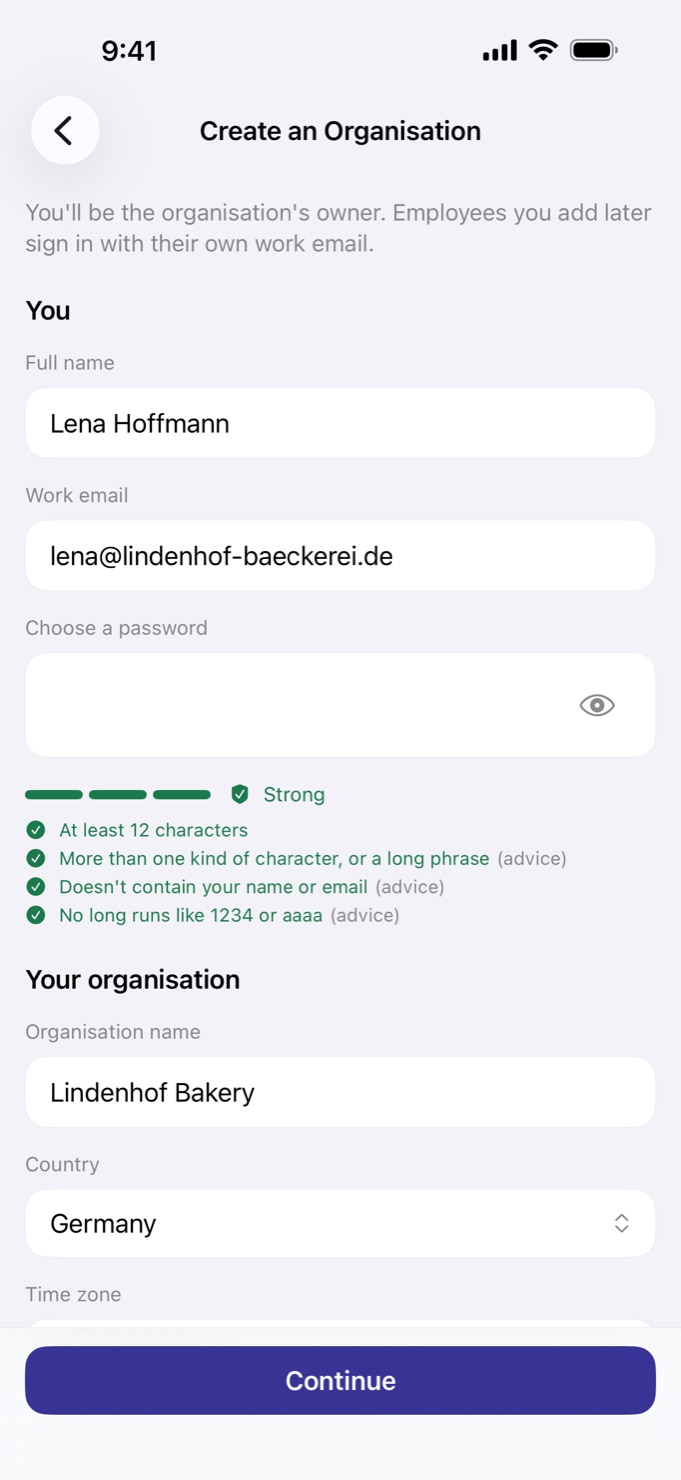
Your name, work email, company and country. Confirm with a 6-digit code and protect the account with an authenticator app.
Put your office on the map
Drop the pin and set the boundary. Your working week, leave types and public holidays arrive pre-set for your country.
Invite your team
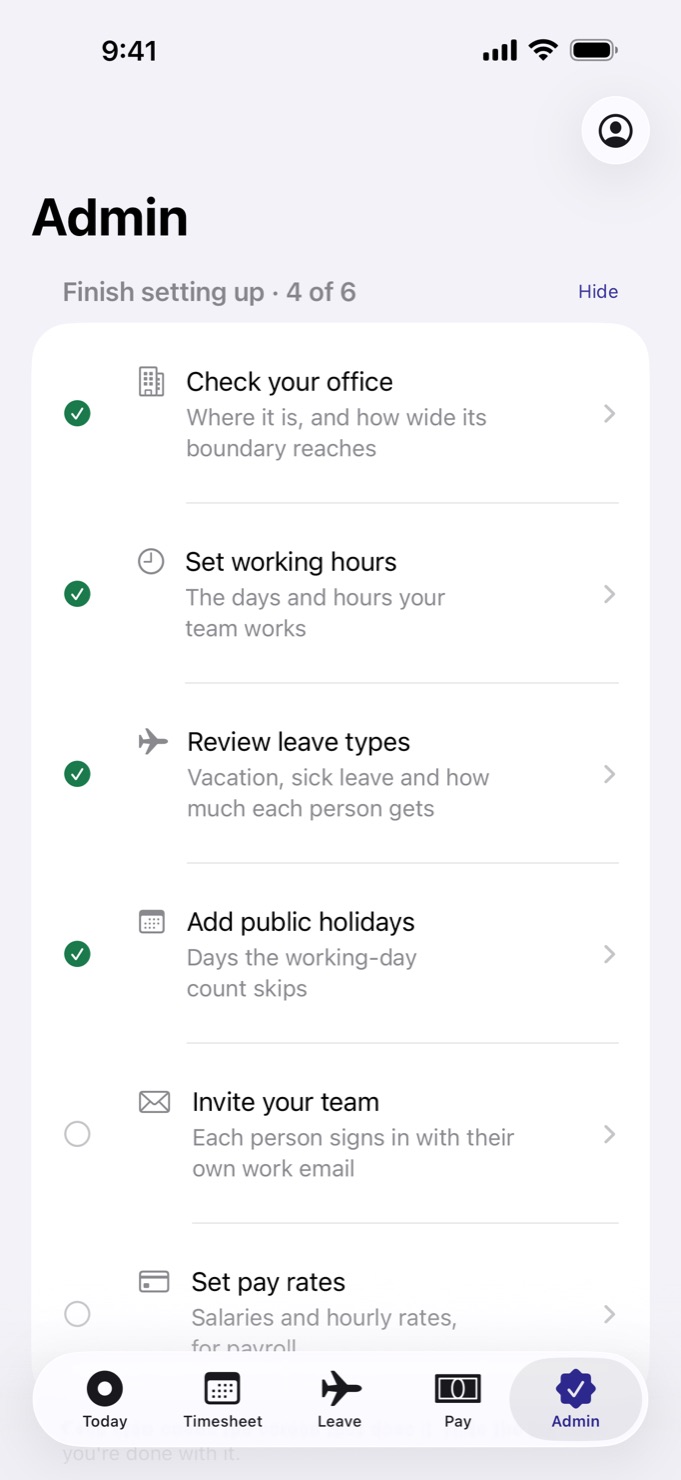
A checklist walks you through hours, leave and pay rates. Each employee gets an email invitation, sets a password and clocks in.
Try it: your starting setup
IllustrationWhat you start with
- Working week
- Mon–Fri, 09:00–17:00
- Lunch
- 30 min, unpaid
- Paid hours per day
- 7 h 30 m
- Annual leave
- 20 days a year; up to 5 days carry over, until 31 March
- Overtime
- after 40 h a week, at 1.5×
- Working-time warnings
- 48 h average week; 11 h daily rest
- Currency
- EUR
- Public holidays
- this year’s and next year’s for Germany, imported
Free: €0 for 10 employees. Every feature, no paid plan.
Everything here is editable after sign-up.
Download on the App StorePricing
Free.
Every feature, for any number of employees. There's no paid plan, nothing to buy in the app or on the website — and employees never pay.
- Any number of employees — no seat limits
- Clock-in, breaks, timesheets, leave and pay on iPhone
- Approvals, missed-day review, corrections and schedules
- Pay periods, ledger and CSV & Excel payroll exports
- All four detailed reports in the web dashboard
- Geofencing, App Attest, anomaly queue and audit log
- 44 languages, widgets and Live Activity
- No subscriptions and no in-app purchases
No catch
No ads, no analytics, no data sales
There's no advertising, analytics or tracking in the app or on this site. How both sides are protected.
Leave any time
The owner can delete the organisation from Organisation settings. After a 14-day grace period in which it can be cancelled, every record and stored file of the organisation is erased.
Your payroll data goes with you
Export any pay period as CSV or Excel, and the detailed reports too.
Who runs it
Operalytix is operated by Evolves EOOD, Sofia, Bulgaria. Businesses get a Data Processing Agreement.
Is Operalytix really free?
Yes. Every feature is free for any number of employees. There are no subscriptions, no in-app purchases and nothing to buy on the website, and employees never pay. See the Terms of Service.
Which devices does it run on?
Operalytix Employee is an iPhone app. Administrators and accounting can also work in the web dashboard at app.operalytix.com from any modern browser.
How do employees join?
By invitation only. An administrator adds them, they receive an email from noreply@operalytix.com, set a password on their iPhone and sign in. Nobody can sign up to your organisation on their own.
How does geofenced clock-in work?
Administrators put each office on the map with a boundary around it, which the setup screen lets you set from 50 metres to a kilometre. A clock-in needs a precise, fresh location fix; a missing, imprecise or simulated one is refused. A clock-in inside the boundary counts as at work. One outside the boundary, or one the app can't be sure about, goes to an administrator's review queue and is never silently dropped; its minutes aren't paid until it's approved.
Does the app track employees' location all day?
No. Location is read at the moment of a punch, and there is no continuous background tracking. While someone is clocked in, the times they leave the office area and come back are sent to their employer. The optional arrival reminder watches the office location on the phone only and sends nothing.
What if there's no signal at the workplace?
Punches taken offline are saved on the phone and sent automatically when the connection returns. A punch that takes unusually long to arrive is flagged so a manager can take a look.
What happens if someone forgets to clock in or out?
Employees get reminders for a shift starting soon and a missing clock-out. Administrators can correct a shift, with the reason recorded. For people on a fixed monthly salary, a scheduled day with no clock-in goes to an administrator to decide: a fine, a paid day off, a day from a leave balance, or an unpaid day.
Does it handle night shifts?
Yes. Work schedules can include night shifts that run past midnight. A 22:00–06:00 shift counts as one working day, the day it began, worked out in the office's local time, so it stays correct when the clocks change for daylight saving.
Can employees request sick leave with a doctor's note?
Yes. A leave request can carry a document such as a medical certificate: the employee attaches it to the request in the app, then follows the request until it's decided.
Can our accountant get access?
Yes. Give them the accounting role: they sign in to the web dashboard with their own account and second factor to work with pay periods and exports.
How does payroll export work?
Export any pay period as CSV or Excel. A locked period exports final figures; an open one exports a file clearly marked provisional. The detailed reports export to CSV and Excel too.
Which payroll formats can I export?
CSV and Excel, one file per pay period. The four reports (hours and overtime; punctuality and attendance; breaks, location and fines; leave and corrections) export in the same two formats.
Does it watch the EU Working Time Directive?
Yes. Operalytix warns when average weekly working time goes over 48 hours across a 17-week reference period, and when a shift starts less than 11 hours after the previous one ended. Warnings never block a clock-in: nobody is stopped from clocking in for work they're doing.
How is personal data handled?
There's no advertising, analytics or tracking. Each employee can see and export everything held about them and delete their account from the app. Businesses get a Data Processing Agreement. Operalytix is operated by Evolves EOOD in Sofia, Bulgaria. The full details are in the privacy policy.
What if we stop using it?
The owner can delete the organisation from Organisation settings. There's a 14-day grace period in which it can be cancelled; after that, every record and stored file of the organisation is erased.

Your team's time, finally in order.
Set up your organisation in the app, invite your team, and let Operalytix keep the record.
Free for any number of employees · no card · delete your organisation any time